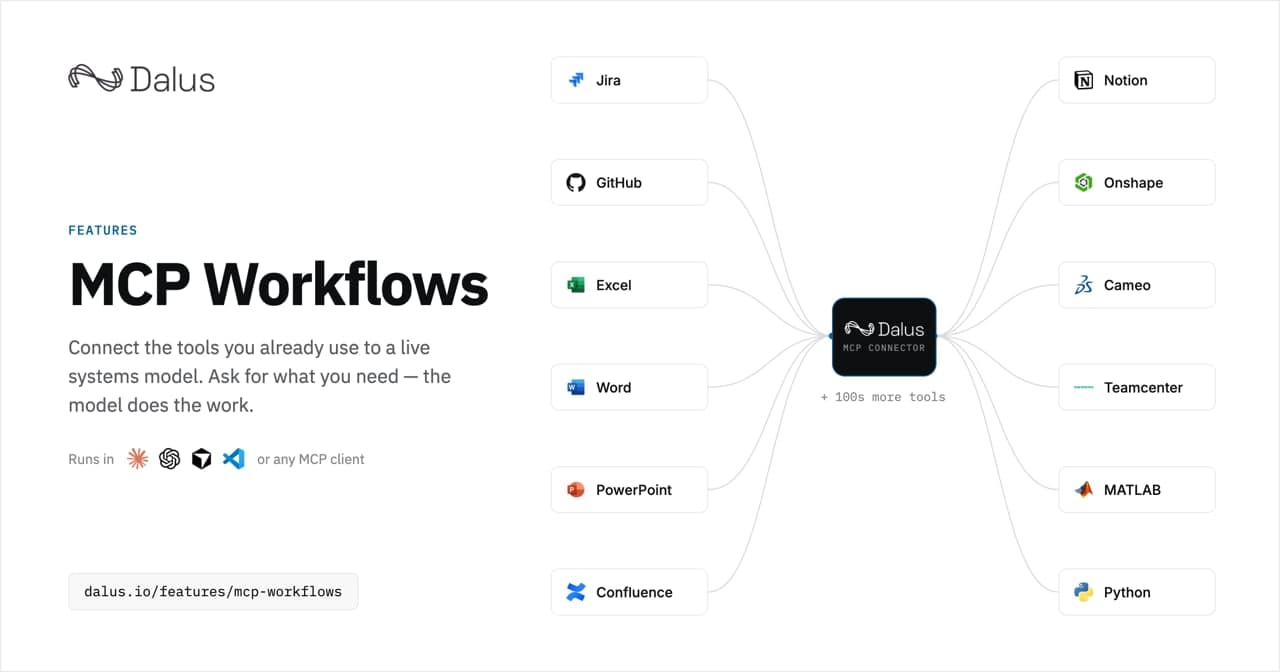
Most systems engineering work doesn't happen in the systems model. It happens in the tools around it: the requirements spec in Word, the compliance matrix in Excel, the review deck in PowerPoint, the tickets in Jira, the requirements baselines in DOORS or Jama or Polarion. And most of the effort in those tools is transcription — exporting the model, reformatting it, pasting it somewhere, and watching the copies drift out of date the moment the model changes.
The Dalus MCP Connector removes that transcription layer. It connects your live systems model to the AI assistant you already use — Claude, ChatGPT, Cursor, VS Code, or any other client that speaks the Model Context Protocol — so the assistant can read the model directly, run checks against it, produce documents from it, and stage changes back for your approval.
What is MCP, and why does it matter for MBSE?
MCP — the Model Context Protocol — is an open standard that gives an AI assistant a structured way to use other software. Before it, wiring an assistant to an engineering tool meant a custom integration for every pairing, built and maintained by hand. MCP replaces that with one protocol: a tool publishes a connector that speaks it, and any assistant that speaks it can use the connector.
That architecture matters more for model-based systems engineering than for almost any other discipline, because MBSE's core problem has always been connection. The model is supposed to be the single source of truth, but the truth has to travel — into documents, into project trackers, into legacy requirements databases, into review rooms. Every hop has historically been manual. MCP makes the model reachable from the place where you already describe what you need: a chat.
Because the protocol is an industry standard rather than something we invented, nothing here is proprietary glue. One connector serves every client, and the same prompt works whether your team lives in Claude, ChatGPT, Cursor or VS Code.
How the Dalus MCP Connector works
You connect once: add the Dalus connector in your client's settings and sign in with your Dalus account. There is no server to run and nothing to install. From then on, the assistant can reach your system model — requirements, architecture, interfaces, budgets, hazards and verification — as the live model, not an export of it.
- Ask in plain language. Paste a prompt from the workflow library, or just describe what you need. The assistant reads the model through the connection instead of through exports and copy-paste.
- Reads simply happen. "Which requirements in the propulsion model have no passing verification?" is answered from the live model, and nothing changes.
- Writes are gated. Anything that would change the model is shown to you as a full change set first, and nothing lands until you approve it.
- It works as you. The connection carries your login and your permissions — the assistant sees what you can see, and no more. Every run has an obvious author.
That last pair of points is the part security-conscious teams ask about first. There is no background sync and no daemon watching your model: a workflow runs because somebody started it, reads are scoped to that person's access, and writing remains a human decision.
100+ workflows, each one a prompt you can read first
A connector on its own is infrastructure. What makes it useful is knowing what to ask. So alongside the connector we published a library of over one hundred MBSE workflows — and every one of them is simply a prompt, shown in full before you run it. No macros, no plugins, no recorded scripts. If you can read the prompt, you know exactly what the workflow will do.
The library is organized by what you want to get done:
- Generate a deliverable — requirements specifications, interface control documents (ICDs), FMEAs, compliance matrices and review decks, built from the live model instead of assembled by hand.
- Get your data in — requirements from Excel, DOORS, Jama and Cameo into a live SysML v2 model, IDs intact.
- Keep systems in step — the model, Jira, Linear and your codebase telling the same story, with drift surfaced instead of discovered.
- Check the model — traceability gaps, unverified requirements and stale baselines, found before the review board finds them.
- Verify against reality — your simulations, tests and analyses, tied to the requirements they answer.
- Publish and review — the model published where people actually read (Confluence, SharePoint, Word), and their decisions carried back.
Across those outcomes, the workflows are written for the tools engineering teams already run: Jira, Linear, GitHub and GitLab on the project side; Excel, Word, PowerPoint, SharePoint, Microsoft Teams, Confluence, Notion and Google Docs on the documents side; Teamcenter, Cameo, DOORS, Jama and Polarion in requirements and PLM; Altium Designer, Onshape and Autodesk Fusion in CAD and EDA; Python, Ansys STK and MATLAB/Simulink in simulation and analysis.
What this looks like in practice
Take the deliverable most programs dread: the review deck. A Preliminary Design Review presentation is judged against review criteria, not a table of contents — mission context, architecture, budgets, open items, all of it traceable to the model it describes. With the connector, the workflow reads the live model and assembles that evidence into a deck, and it is explicit about what the model does not yet hold. The prompt that does this is published in full on the workflow's page, so you can read every instruction before you run it.
Or take the quiet, constant work of keeping systems honest. A requirement changes in the model; the Jira epics that implement it don't know. A verification closes in the test campaign; the compliance matrix in Excel still says open. These are exactly the seams where programs bleed hours, and they are the seams the sync and check workflows are written for: ask, and the assistant walks both sides of the seam and reports what disagrees.
Frequently asked questions
Does it work with ChatGPT, or only Claude?
Both, plus Cursor, VS Code, and any other MCP client. MCP is an open protocol; the Dalus connector serves whichever client your team already uses, and the workflow prompts are client-agnostic.
Do I need to run a server or install a plugin?
No. You add the Dalus connector in your client's settings and sign in. There is nothing to host, nothing to build, and nothing installed per machine.
Can the AI change my model without me knowing?
No. Reads happen directly, but anything that writes is staged as a full change set and shown to you before it lands. The connection also runs with your permissions, so the assistant can never see or touch more of the workspace than you can.
What about tools like MATLAB or Teamcenter?
The library's prompts pair the Dalus connector with the other connections your team already has. Where a workflow spans another tool, it says so on its page — including what that tool's side of the connection needs to look like.
Getting started
If you're new to the protocol itself, start with our plain-terms explainer on what MCP is and how the connection is shaped. If you'd rather see it than read about it, open the workflow library, pick the tool or the outcome closest to your week, and read the prompt — that is the entire interface. Then connect the Dalus connector to your client and run it.