 LIVE
Jira Integration
Keep requirements in Dalus and issues in Jira in step. Link requirements to Jira issues, map fields once, and track the implementation tasks behind each requirement.
Book a demoWhat you can do
- 01
 Connect Jira once for your whole team
- 02Choose which Jira projects Dalus can use
- 03Map Jira fields and workflow statuses to requirement fields
- 04Linked requirements sync automatically in both directions
- 05Link implementation tasks and see their Jira status
- 06Sync history and audit log in model settings
How it works
Read the setup guide
- 1
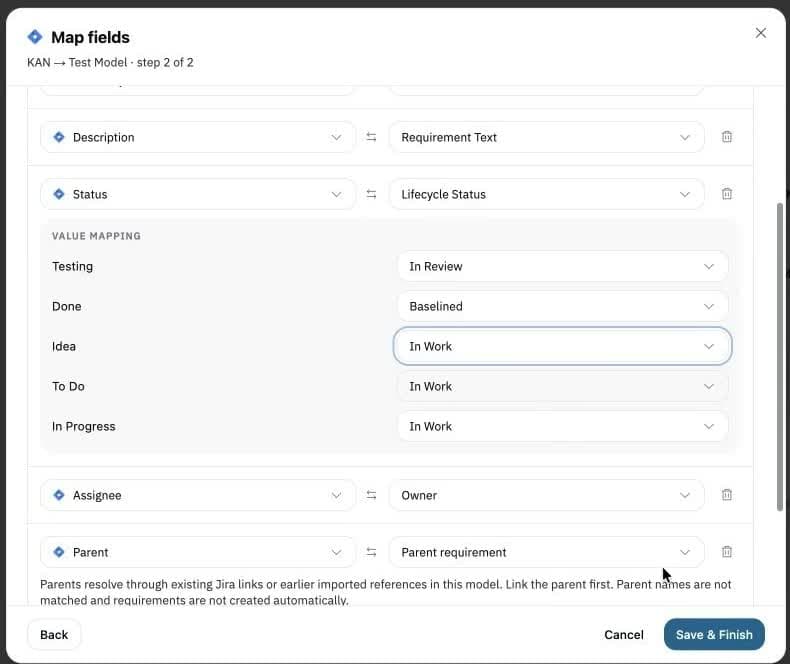
Map fields once
Pick the Jira issue type that represents your requirements, review the suggested mappings, and match workflow values such as statuses.
- 2
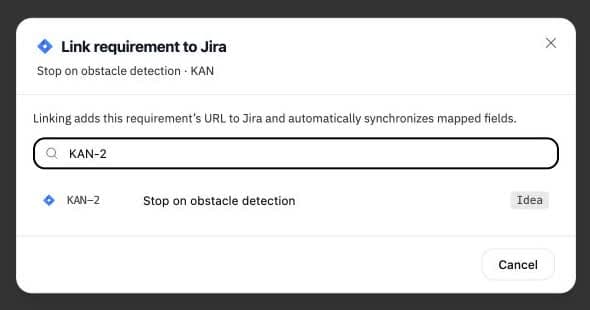
Link a requirement
Search by issue key or title and link the matching issue. Mapped fields then sync in both directions, and Jira gets the requirement's URL.
- 3
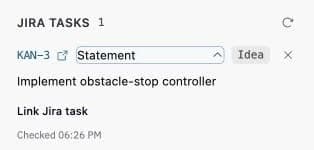
Track the work
Link the implementation tasks behind a requirement and see their current Jira status. Task links show Jira work without changing requirement fields.
Other integrations
 Learn more
 Python
Import and export engineering data via Python scripts and automation pipelines.
 Learn more


 OneDrive, SharePoint & Excel
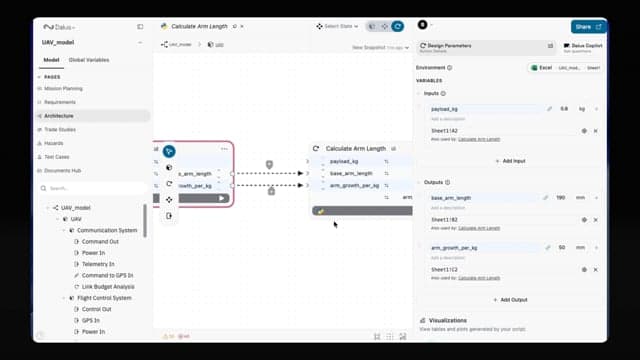
Sync requirements and data directly from Excel spreadsheets stored in OneDrive or SharePoint.
 Learn more
Onshape
Link your CAD models and design data from Onshape into your system architecture.

Use Dalus from your AI assistant
and your everyday tools
The Dalus MCP Connector gives Claude, ChatGPT and other AI assistants direct access to your model. Pair it with Jira, GitHub or Excel, and your assistant can work across all of them at once.
Generate a design review, test plan or ICD straight from your Dalus model.


Let’s discuss your
systems engineering challenges
Tell us what you’re building, and we’ll show you how Dalus can help.

30-minute discovery call with Sebastian
Co-founder, Dalus
No time that works? Send us a message and we’ll find one.