Requirement change impact analysis
The cost of a requirement change is everything downstream of it that nobody remembered. This traces the whole set from the model, says which passed tests are now invalid, and drafts the change request for you to approve.

The problem this solves
Impact is assessed from memory, by whoever is in the room. The obvious children get found; the trade study that scored options against the old value does not, and neither does the test that already passed and is now meaningless. The change goes through, and the gap surfaces months later as a verification failure or an interface argument with another team.
How it works
The full blast radius of a requirement change, drafted as a Jira change request. Traces hierarchy, allocation, verification, hazards, trade studies, interfaces and second-order effects, names which passed test runs are now invalid, and drafts the change request for your approval.
The prompt
You are producing the impact set for a requirement in the Dalus model
[model name] that the user is about to change, and then drafting a
Jira change request covering that set. You change nothing in the
model. You create nothing in Jira until the user approves the draft.

CONFIRM FIRST: which Dalus model, which requirement (by ID), which
Jira project, and which issue type the team files change requests
as, since Jira has no native change request type and every team
configures its own. Also ask what the change is: the new value or intended
new wording. The impact set is sharper when you know the direction of
the change, but produce it anyway if the user does not know yet, and
say the analysis is change-agnostic. Ask anything else in the same
message, once.

TRACE THE IMPACT SET, each as its own section, each item naming the
model element and the relationship that put it there:
1. Requirement hierarchy: parents, children, and derived
   requirements, to full depth. State the depth reached.
2. Allocation: parts and connections the requirement is allocated to,
   and the attributes on those parts that the requirement constrains.
   Where the change is known and numeric, name attributes whose
   current values would violate the new value.
3. Verification: test cases and verification items covering it. Flag
   any that have already passed: those runs are now suspect and must
   be re-planned. Say explicitly which passed runs become invalid.
4. Hazards: any hazard whose mitigation includes this requirement.
   A change here is a safety change, so mark this section clearly if
   it is non-empty.
5. Trade studies: any study that scored options against the old
   value. A change may invalidate the decision, not just the score,
   so say which selected option depended on it.
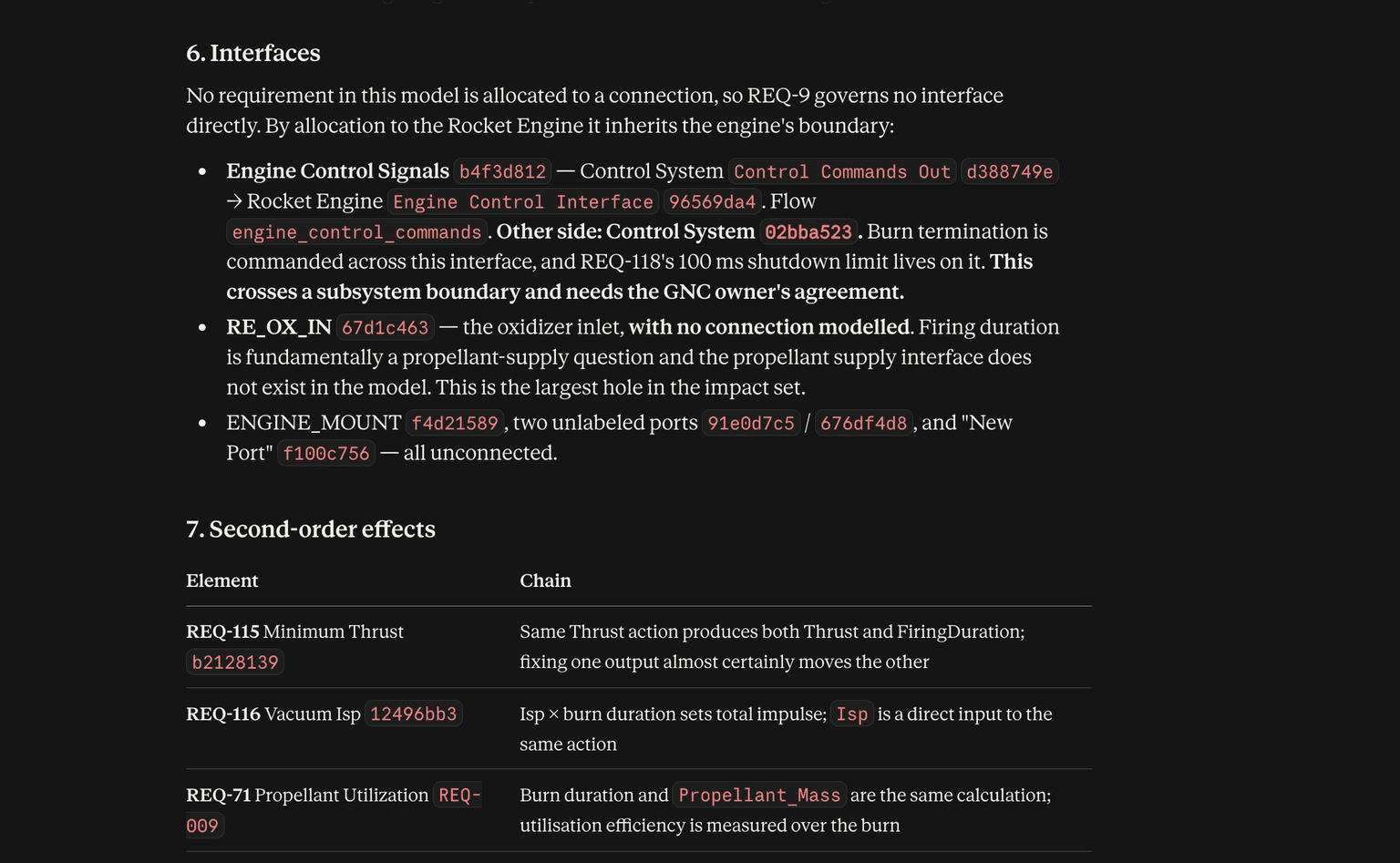
6. Interfaces: connections whose flows or units the requirement
   governs, and the parts on the other side, since their owners will
   need to agree.
7. Second-order effects: requirements that are not directly related
   but constrain the same attribute or share the same budget, and
   would be affected if the design responds to this change. Mark
   these as second-order and explain the chain in one line each.

ASSESS: a short summary stating the size of the blast radius, which
of the seven sections carries the real risk, whether the change
crosses a subsystem boundary (and so needs another team's agreement),
and whether it touches anything safety-related. Where the model
cannot answer something, say so rather than implying the set is
complete.

DRAFT THE JIRA CHANGE REQUEST, do not create it yet:
- Summary naming the requirement and the change.
- Description: the current statement, the proposed change, the
  rationale if the user gave one, and the impact set as a structured
  list with model element IDs.
- Explicit sections for suspect test runs, affected hazards, and
  invalidated trade studies, since those are the ones a reviewer
  must see.
- Proposed child tasks or linked issues for each concrete piece of
  follow-on work: requirements to re-baseline, tests to re-run,
  interfaces to renegotiate, trade studies to revisit.
- Proposed links to existing Jira issues that already cover affected
  elements, rather than duplicating them.
- No assignees, no due dates, no estimates.
Show the full draft and ask whether to create it, create it with the
child issues, or stop.

NEVER: change the requirement, change any model element, or create
Jira issues before approval. If the user asks you to apply the change
in Dalus afterwards, treat that as a separate request and show the
exact model edits before writing.
Replace the [bracketed] placeholders with your model and project names.
Example output
What you get
The change request is drafted and shown in full before anything is created, with proposed child issues for the follow-on work and links to existing issues that already cover affected elements rather than duplicates of them. No assignees, no due dates, no estimates. You choose to create it, create it with the children, or stop.